Your phone stays yours
The worker smartphone is a second device. It holds the VW app, the worker app and accessibility. Your everyday phone is left alone.
 SnoozeCamp
For the ID. family
Long climatisation through the night, up to 48 hours, even while you sleep in the car. In the VW app it ends after about 30 minutes. The same is true for the ID.3, ID.4, ID.5, ID.7, ID. Polo, ID. Tiguan and ID. Buzz Cargo.
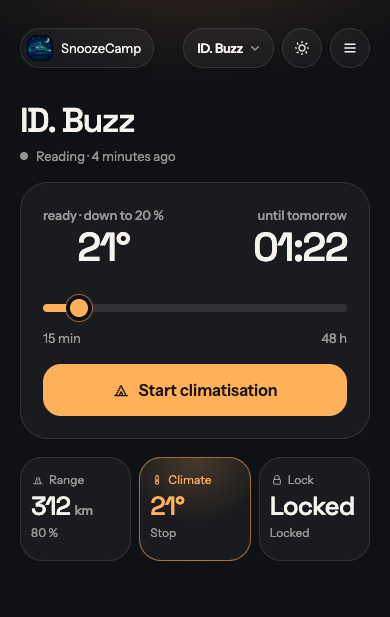
SnoozeCamp starts climatisation again until the time you choose. Today, tomorrow or the day after, at most 48 hours. Cooling in summer or heating with the auxiliary heater in winter.
How it works
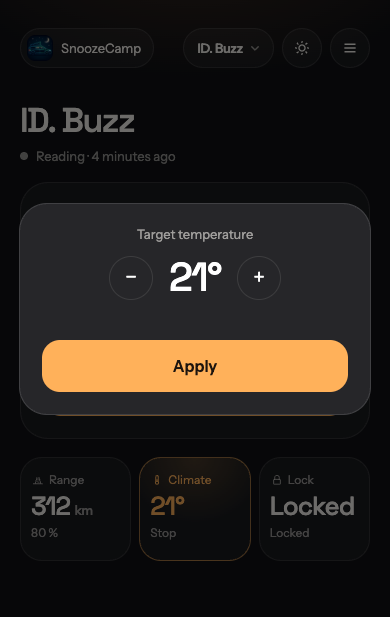
In the browser you slide the clock to today, tomorrow or the day after and set the target temperature. Sign-in is a passkey, with no password.
The VW app ends a running climatisation after about 30 minutes. A second phone opens the app and taps Start again until your end time.
In the ID., climatisation keeps running while you sleep in the car. When the battery reaches the limit you set, it stops.
Second phone
The VW app has no switch for a long climatisation through the night. SnoozeCamp operates it from the outside. A separate phone taps the buttons.
The worker smartphone is a second device. It holds the VW app, the worker app and accessibility. Your everyday phone is left alone.
Any old smartphone with at least Android 8 is enough. Sign in to the VW app, pair once with a QR code, and leave it.
The phone does not have to be in the car. The VW app talks to the ID. SnoozeCamp only tells the phone when to start climatisation again.
Older ID. software has no overnight end time. The VW app then shows a short session, about 30 minutes. Camper mode chains those sessions together.
Features
Camper mode runs until a time, at most 48 hours. It always shows whether that is today, tomorrow or the day after.
The worker phone reads range, battery, climate and the lock from the VW app. While climate is running, the tile is highlighted.
When the battery reaches the discharge limit, climatisation does not continue. Range remains for the departure.
Climate and status need no extra confirmation. You sign locking and unlocking with the passkey. The phone checks the signature itself.
The app
Price
€0
for now, no subscription
SnoozeCamp costs you nothing at the moment. All you need is a second Android phone with the VW app.
A small yearly fee may come later. It would pay for the relay server through which the app and the worker phone talk to each other. Before any fee applies, we will tell you in advance and you decide whether to carry on.
Questions
Yes. SnoozeCamp needs its own worker smartphone that does only this job. An old phone with at least Android 8 is enough. It runs the VW app, signed in to your VW account, the SnoozeCamp worker app and the accessibility service the worker app uses to tap in the VW app. Your everyday phone stays untouched and only needs a browser.
For using it, yes. The web app runs in the browser on iPhone, Android and computers, and you can add it to your home screen. The worker phone has to be an Android device, because only Android allows accessibility services that operate another app.
The ID. Buzz and the other ID. models whose climatisation can be started in the VW app: ID.3, ID.4, ID.5, ID.7, ID. Polo, ID. Tiguan and ID. Buzz Cargo. SnoozeCamp takes the vehicles straight from the garage in the VW app. If a model cannot be locked remotely in the VW app, SnoozeCamp hides the lock for that vehicle. Other brands are not connected.
Anywhere with internet and power, usually at home. It does not need to be in the car or near it, because the VW app talks to the ID. over the internet. Ideally the phone stays on its charger and on Wi-Fi.
No. After pairing with the QR code, the worker app connects to SnoozeCamp on its own, over any Wi-Fi or mobile data. So you can move the phone somewhere else. It only has to stay online.
The car has to be reachable for the VW app, which means mobile reception, and the online services have to be active in the VW app. Whatever you can start remotely in the VW app, SnoozeCamp can start too. If the car is parked underground without reception, the VW app cannot get through either.
Until the time you set in SnoozeCamp: today, tomorrow or the day after, 48 hours at most. The VW app ends a climatisation after about 30 minutes. The worker phone then restarts it in the VW app until your end time is reached. You can stop camper mode earlier at any time.
That depends mainly on the outside temperature, the target temperature and the vehicle. As a rough guide, holding the temperature takes about 0.5 to 1.5 kW, heating up or cooling down at the start takes more. An eight-hour night therefore often comes to around 4 to 12 kWh. With a 77 kWh battery that is about 5 to 15 percent, more in hard frost. SnoozeCamp itself uses no extra energy in the car. In the morning you see the battery level and range in the app.
In the settings you set a discharge limit between 10 and 80 percent, 50 percent by default. If the reported battery level is at or below that limit, SnoozeCamp no longer restarts the climatisation. The running VW app session then ends on its own. That leaves range for the drive on.
Yes. You set the target temperature in SnoozeCamp, in half degrees from 16 to 30 °C. The worker phone enters it in the VW app. In summer the ID. cools with it, in winter it heats.
Yes. If the ID. is connected to a charging point or socket, at a campsite for example, climatisation runs as usual. The energy then usually comes from the grid instead of the battery. How exactly your vehicle handles this is decided by the vehicle software, not by SnoozeCamp.
Older ID. software has no camping mode in the car for staying overnight. The VW app ends climatisation after about 30 minutes, heating in the ID. Buzz included. SnoozeCamp chains these sessions until your chosen time.
Then SnoozeCamp cannot restart the climatisation. A running session ends after about 30 minutes, as usual in the VW app. In the web app the reading time shows when the phone last delivered data. As soon as it is back online, it reconnects on its own.
With a passkey: Face ID, Touch ID, fingerprint or the device PIN. There is no password anyone could guess or phish. Your device or your password manager stores the passkey. The server only knows the public key.
Not without you. By default, unlocking and locking need a second confirmation with your passkey. The command is signed, and the worker phone checks the signature itself before it taps. So the server alone cannot open the lock. You can turn this prompt off in the settings, which also needs your passkey. After that, being signed in to SnoozeCamp is enough.
Nowhere. The screen lock of the worker phone and the S-PIN of the VW app stay on the worker phone. They are not sent to SnoozeCamp and not stored on the server.
On servers of Hetzner Online GmbH in Nuremberg, Germany. We store what the service needs: your email address, the public part of your passkey, your vehicles with their last reading, and the commands with their result. There is no tracking and no advertising. The details are in the privacy policy.
No. SnoozeCamp is an independent project and does not belong to Volkswagen. It is not a feature of the VW app and uses no Volkswagen interface. The worker app operates the VW app through the Android accessibility service, just as you would with your finger.
Nothing at the moment. A small yearly fee may come later to pay for the relay server. Before any fee applies, we will tell you in advance and you decide whether to carry on. Apart from SnoozeCamp you only need the second Android phone.
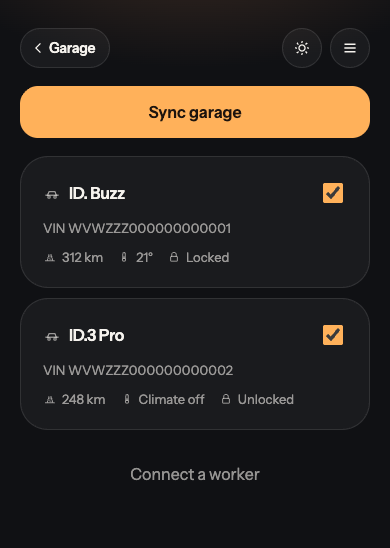
Yes. SnoozeCamp takes all vehicles from the garage in the VW app. You choose which ones appear at the top of the app and switch between them there. One worker phone is enough for that.
In the settings of the web app. You can export your data as a file there first. Deleting removes your account, your vehicles and the paired workers. Afterwards you can simply uninstall the worker app from the phone.
Climatisation through the night, up to 48 hours. The second phone usually stays at home.